
How to upload documents

Uploading Documents
How do I upload my documents to be checked?
As part of the online registration process, you will be prompted to upload your immigration documents. This step is essential to enable the ISS Compliance Team to complete your Immigration Document Check.
Please note: You will not be able to proceed to the next stage of the Enrolment & Registration process until this check has been fully completed.
Follow the below instructions and naming conventions to upload your documents.
To upload your documents, please click the following link: Upload Your Immigration Documents
If you need to upload additional documents at a later stage, you can return to the relevant section in Qsis at any time. Use the same link (highlighted in yellow) to submit any outstanding documents.
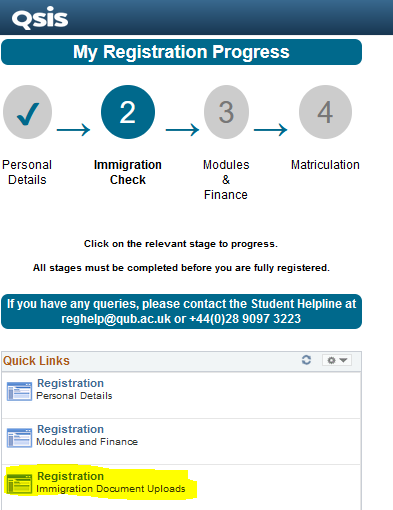
Each time you submit a document, it will be sent through to the Immigration Support Service for verification.
We will check your documents and contact you to either confirm that we have successfully completed your Immigration Document Check or to advise if additional information is required.
Document Naming Conventions when Uploading
| Passport | PPT |
| Visa Decision Email (full email version) | VDE |
| Entry Stamp (full passport page) | ES |
| Travel Details | TD |
| Electronic Travel Authorisation | ETA |
| ATAS (Academic Technology Approval Scheme) Certificate - if applicable | ATAS |